






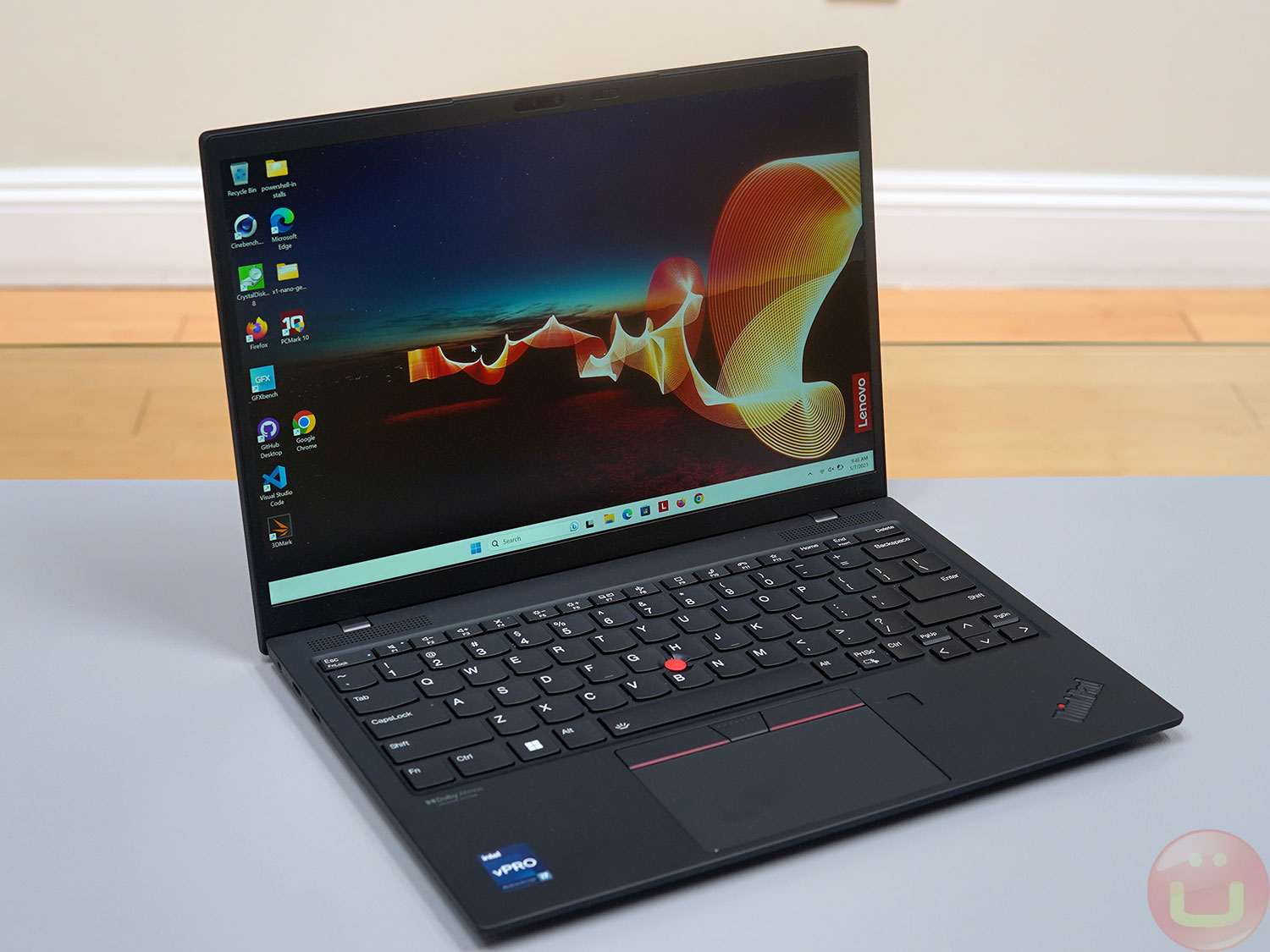
Lenovo ThinkPad X1 Nano Gen 2 — is the successor to the original X1 Nano (Gen 1), which was a breakthrough in the world of ultra-light laptops. The Nano series was designed to push the portability of the ThinkPad X1 series to the limit, and it has proven quite successful.
The second generation takes this concept to the next level with improved system performance and other hardware updates based on careful analysis of user feedback. The second-generation ThinkPad X1 Nano further advances the same ultra-mobility concept. weighing less than two pounds, which was presented initially, but at the time of launch it uses the most modern equipment.
«"About 22% lighter than the MacBook Air"»
Thus, Lenovo is targeting a specific audience for which the most important thing is hypermobility . This is significantly different from most other thin and light devices, such as the ThinkPad X1 Carbon, Dell XPS 13, HP Spectre X360, and, of course, the MacBook Air and MacBook Pro. All of these are designed to be versatile, thin, and light.
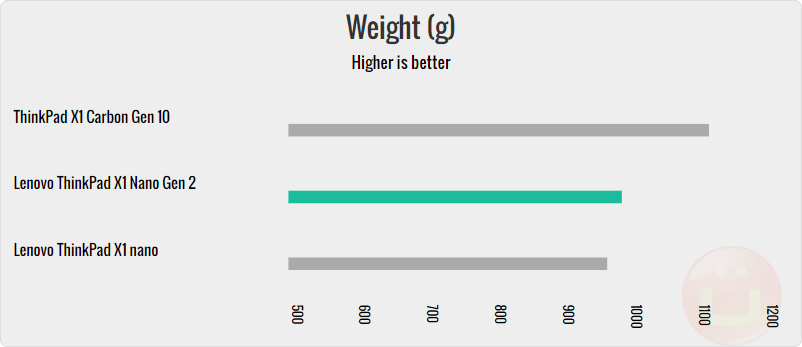
However, the MacBook Air weighs 1270g, while the X1 Nano Gen 2 weighs 1270g. 995 g, which is a very noticeable difference in terms of usability.
The case can also be installed optional 4G or 5G modem for those who want to maximize their productivity. Although Wi-Fi may be While it's widely available, it can't match the instant and ubiquitous coverage of 4G/5G (for a fee).
Main characteristics
Our review unit ($2,150) was equipped with an Intel Core processor. i7-1280P (TDP 28 W), 32 GB of RAM и 1 TB SSD drive , which is excellent for a laptop of this size and weight. Lenovo offers many more processor options depending on your desired computing power and budget.
| CPU | Nuclei | Cache | Graphics |
| Core i5-1240P | 12 (4 P-cores + 8 E-cores) | 12 MB | Intel Iris® Xe |
| Core i5-1250P | 12 (4 P-cores + 8 E-cores) | 12 MB | Intel Iris Xe |
| Core i7-1260P | 12 (4 P-cores + 8 E-cores) | 18 MB | Intel Iris Xe |
| Core i7-1270P | 12 (4 P-cores + 8 E-cores) | 18 MB | Intel Iris Xe |
| Core i7-1280P | 14 (6 P-cores + 8) | 24 MB | Intel Iris Xe |
The built-in RAM can be selected in volume 16 GB or 32 GB Without any additional options, so choose carefully. 32GB of RAM in an ultra-mobile device is an impressive option if you can afford it, but keep in mind that it won't impact benchmark results.
«"A GREAT CHOICE OF MEMORY"»
SSD options available drives with a capacity of 256/512/1024 GB , which should be enough for Lenovo's target audience, which is focused on office work.
Design
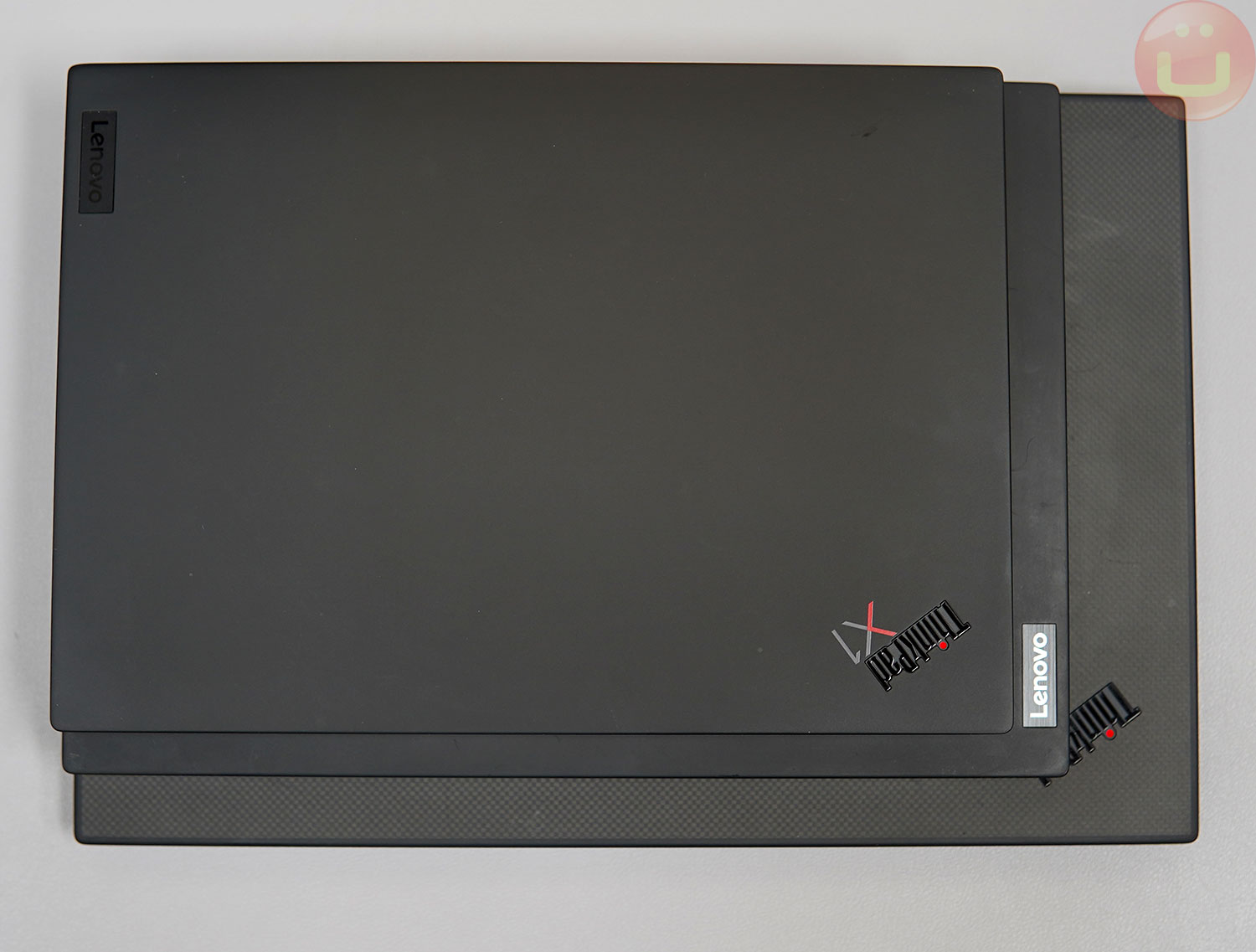 Top to bottom: X1 Nano Gen 2, X1 Carbon Gen 10, X1 Extreme
Overall, the design of the X1 Nano Gen2 is very similar to the previous generation, so everything regarding design, ergonomics and super-portability has remained virtually unchanged, and this version can be considered primarily a performance upgrade.
If you're new to the ThinkPad X1 Nano series and haven't held one before, you might be surprised by how light it is. Many people think I'm giving them an empty laptop case when they pick it up for the first time. This laptop approximately 22% lighter than the MacBook Air .
 Bottom to top: ThinkPad X1 Extreme (bottom), X1 Carbon Gen 10, and X1 Nano Gen 2 (top)
The body is finished in the iconic soft-touch "ThinkPad Black" paint, but if you opt for the more expensive touchscreen version, you'll get luxurious protective film with carbon weave . Unfortunately, it is missing from this particular specimen.
Unlike many other ultraportable laptops, the X1 Nano Gen2 is designed to be opened and serviced by the user (or IT department). The bottom cover can be removed to access the user-replaceable SSD. Unfortunately, the RAM is soldered (a common occurrence in ultraportable laptops).
Keyboard and touchpad
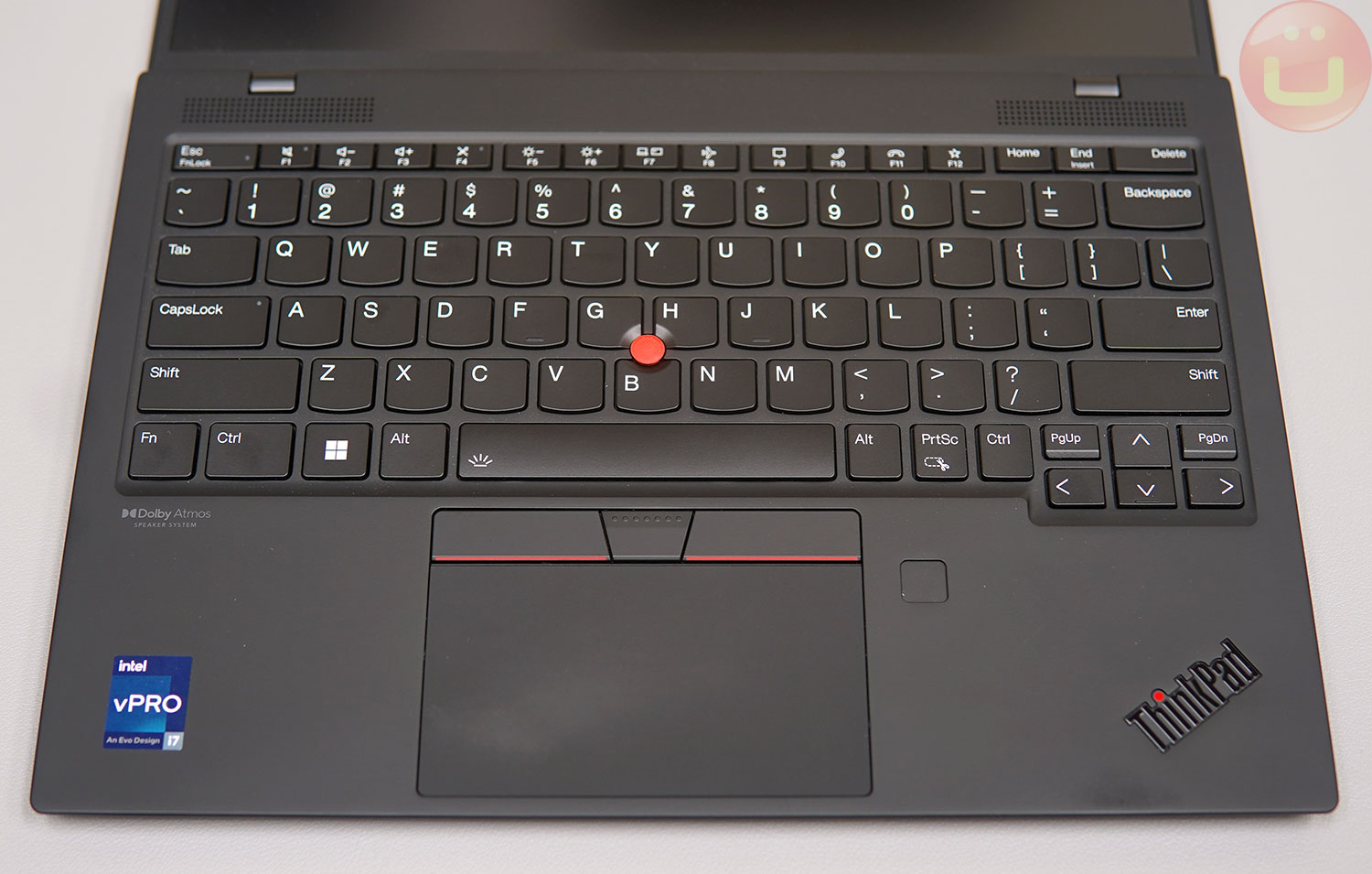
Because of its thinness waterproof The keyboard has less key travel than a standard ThinkPad laptop. However, the key travel remains significantly deeper than the keyboard on newer MacBook Pros, which has extremely shallow key travel.
The tactile feedback here is sharper than on other ThinkPads, and I like it . If you're a ThinkPad fan, you might want to test it out before you buy to see how it fits, but I find it very comfortable and highly recommend it.
For reference, I use an IBM Model M as my desktop keyboard, and a Logitech Mechanical MX Mini mechanical keyboard when traveling. I also own a Keychron V1 (with white Khail switches) and a Keychron K1 (with blue Gateron switches).
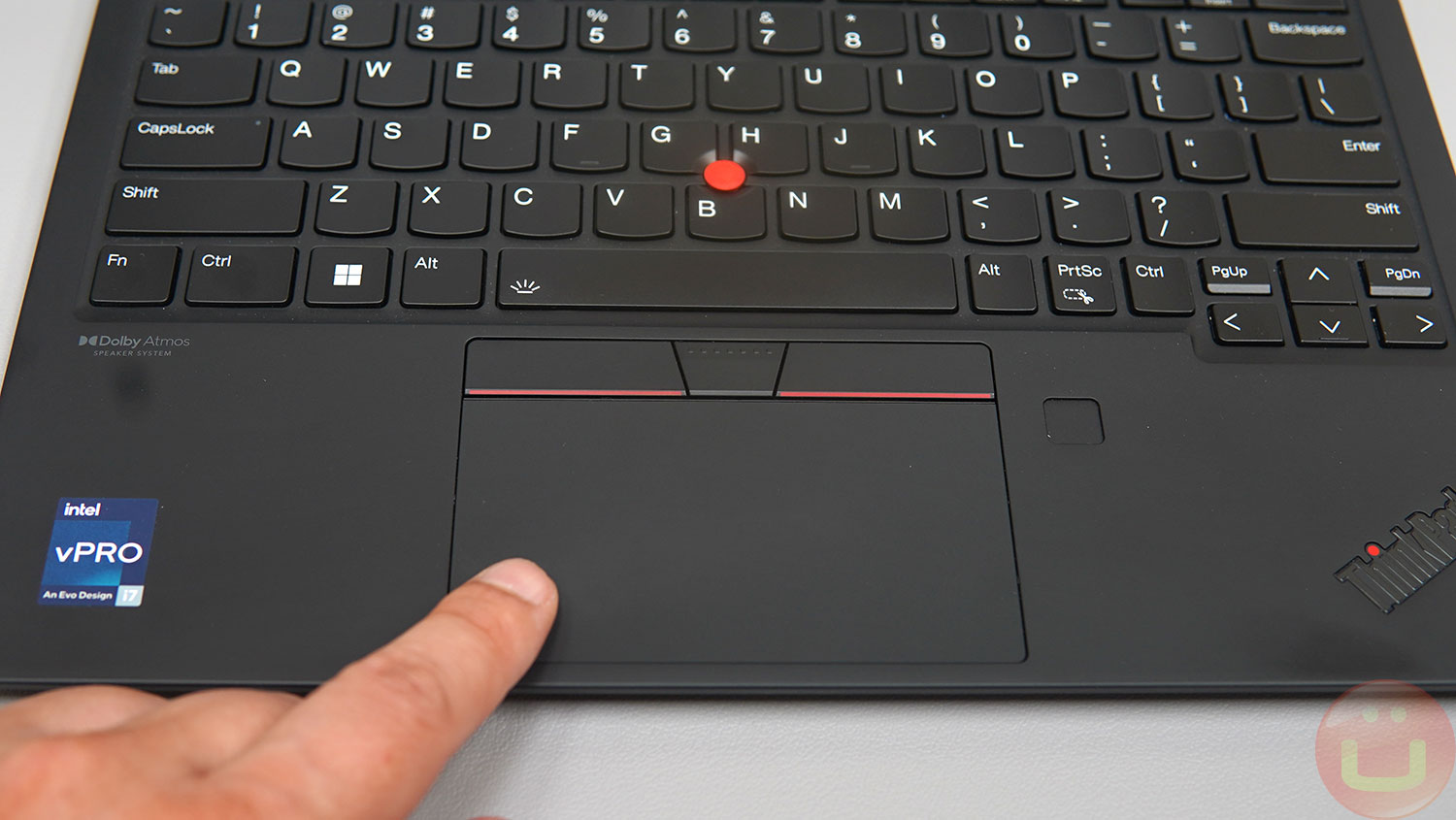
The touchpad is very smooth and works great. It's not the largest for a laptop this size, but I like having physical touchpad buttons because they're more precise. I don't use the Trackpoint, but it remains a highly sought-after feature for many ThinkPad users.
For added security, a fingerprint scanner is located to the right of the touchpad, and I highly recommend using it in addition to recording data from the IR webcam. Both options are very secure and more convenient than entering a long password.
Ports
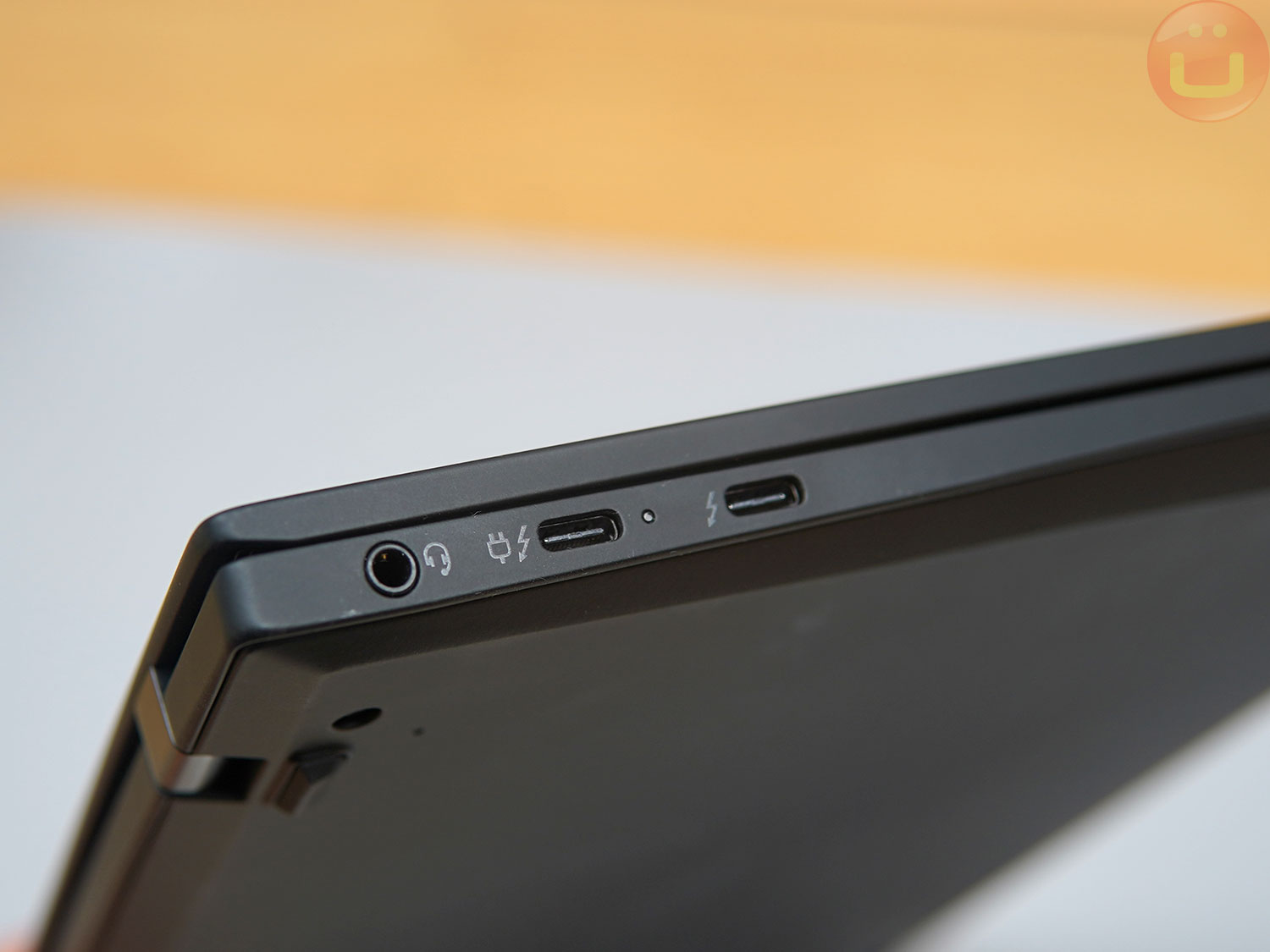
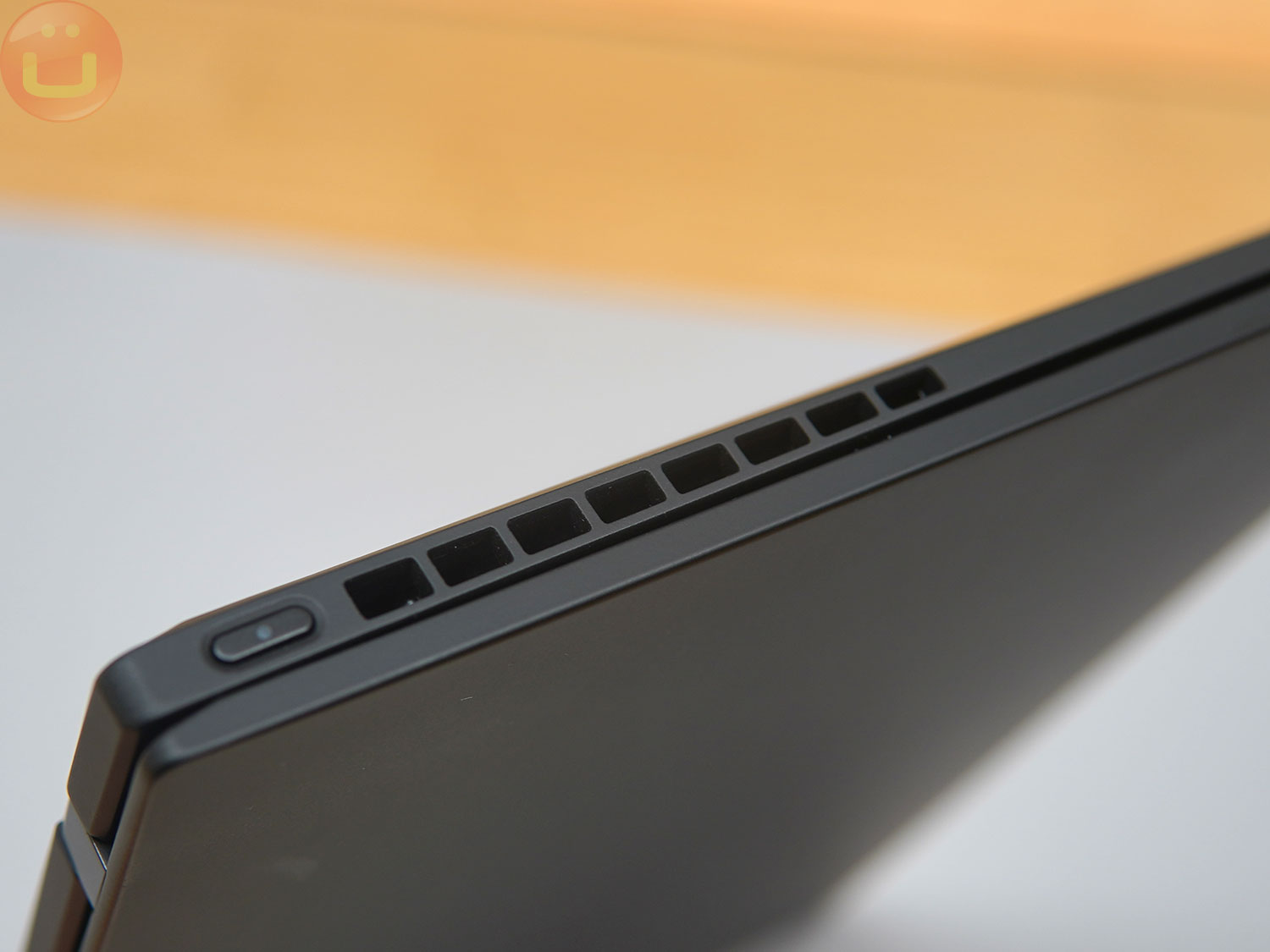
The laptop is so thin that Lenovo hasn't included a single USB-A port or other large ports. This is typical for ultra-mobile laptops. However, the two Thunderbolt 4 ports can be expanded using a TB/USB docking station (from Anker or Sabrent) at home or in the office.
I'm curious to see if Lenovo can modify the rear case to accommodate full-size ports. I don't think it would ruin the laptop's silhouette, but it would provide users with a pair of full-size ports. Having one USB-A port and one HDMI port would be great, but as I understand it, it would be very difficult to implement.
Sound
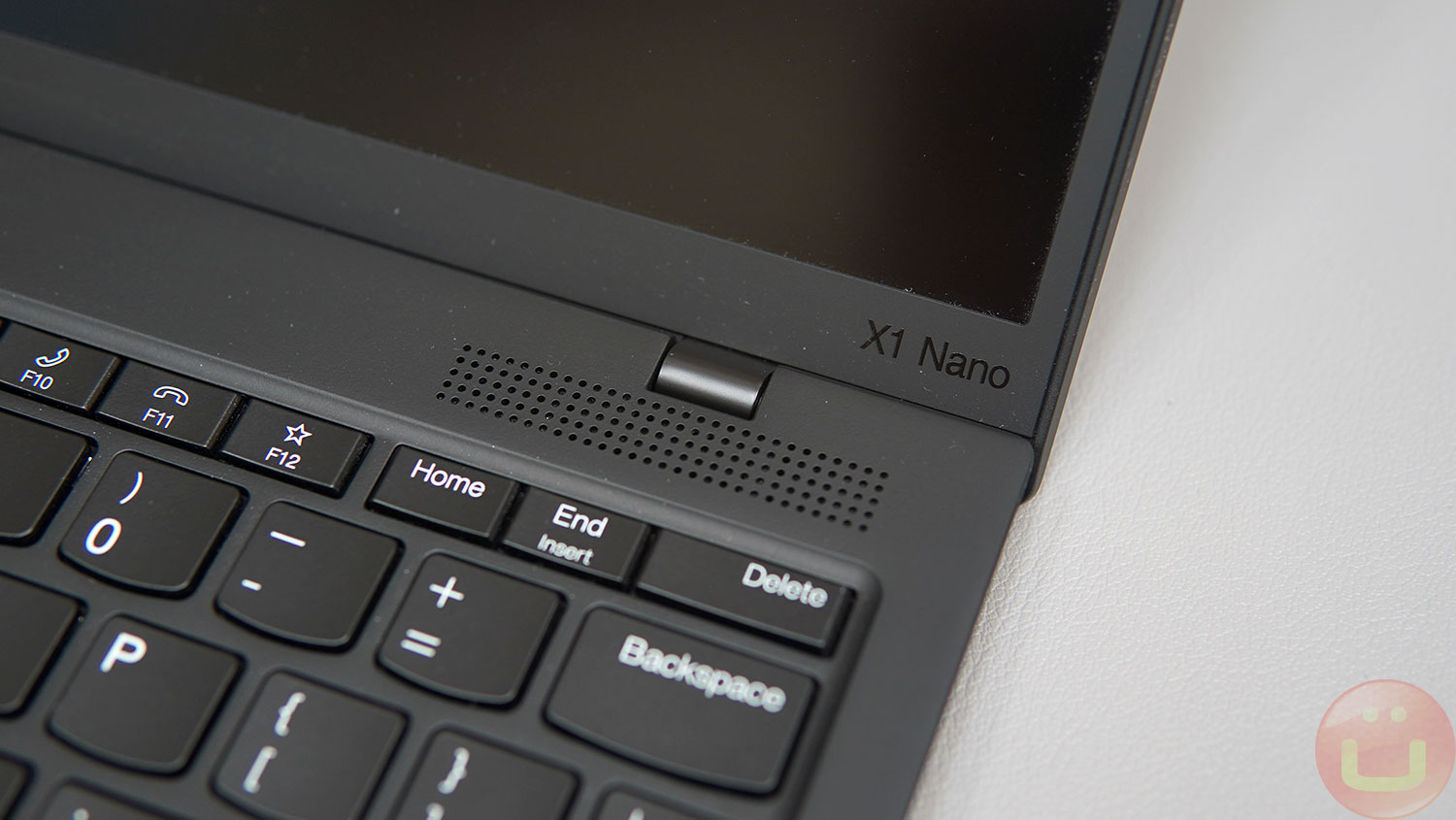

The X1 Nano Gen 1 earphones offer superior sound quality, similar to the original model. The sound coming from four-speaker system (2 x 2W woofers and 2 x 1W tweeters), powerful and overall impressive for headphones of this size . However, at maximum volume there is some distortion, and the bass could be louder.
However, the sound is loud enough that I can't imagine using the 100% at full volume in a hotel room, airport, or even on a group call at the office, so I don't think that would be an issue.
Screen
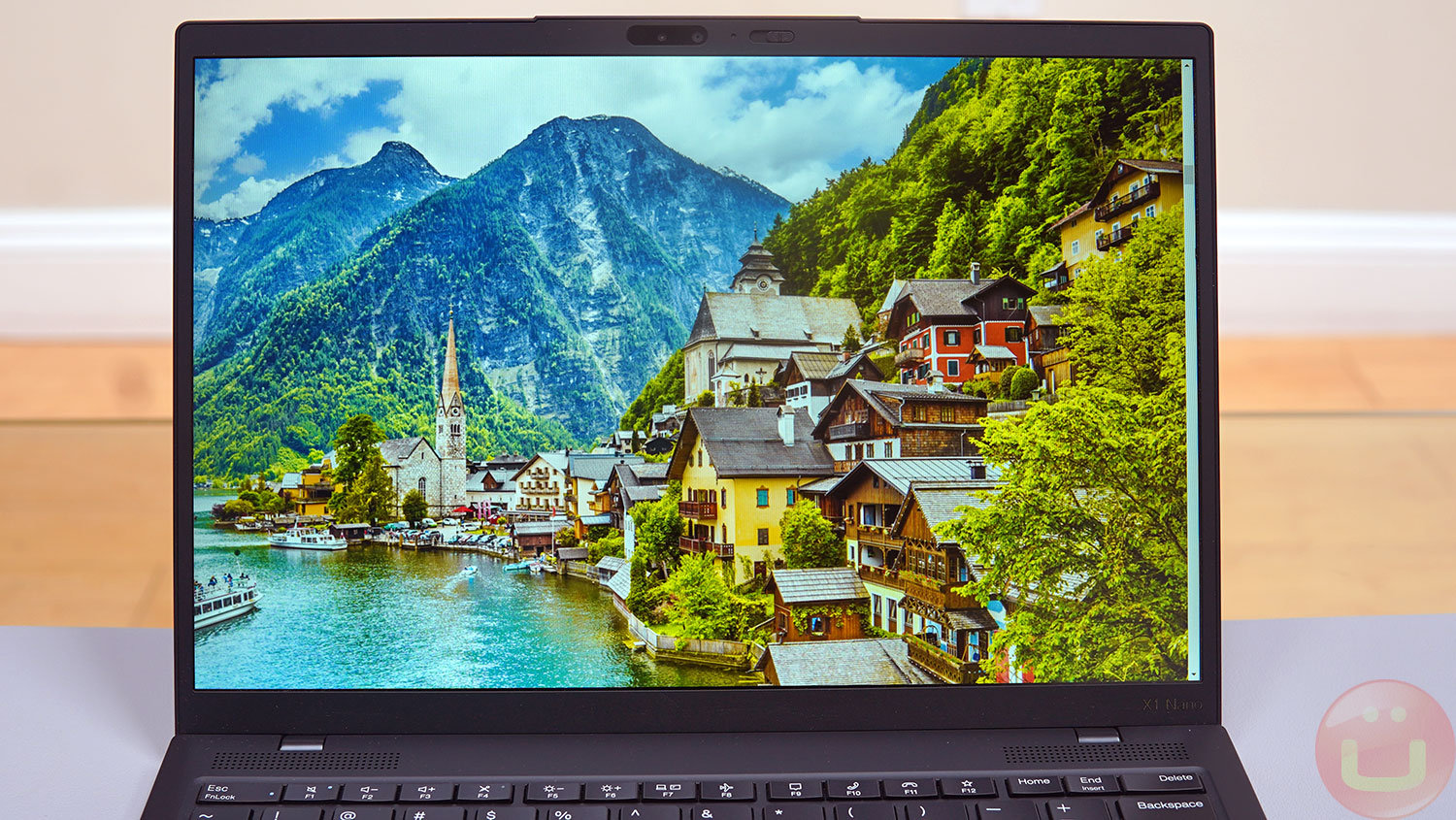
As before, Lenovo offers two options 13-inch display : touch and non-touch . Both use an energy-efficient IPS LCD panel with a refresh rate 60 Hz, 450 nits brightness , 100% sRGB color space coverage , 85 degree viewing angle and 1000:1 contrast ratio.
The screen frame is surprisingly rigid for such a thin display, offering only slight flex when deliberately twisted. Opening the laptop with one hand reveals virtually no flex.
«"FOR PROFESSIONAL, EASY, CREATIVE WORK"»
This outstanding brightness and color gamut make it suitable for professional creative work such as design, photography, and web development. If you need something more advanced, you'll likely need a monitor or a much larger and more expensive mobile workstation.
2K (2160×1350) resolution remains an excellent choice , as it's significantly sharper than 1080p without sacrificing battery life like a 4K display would.
Webcam
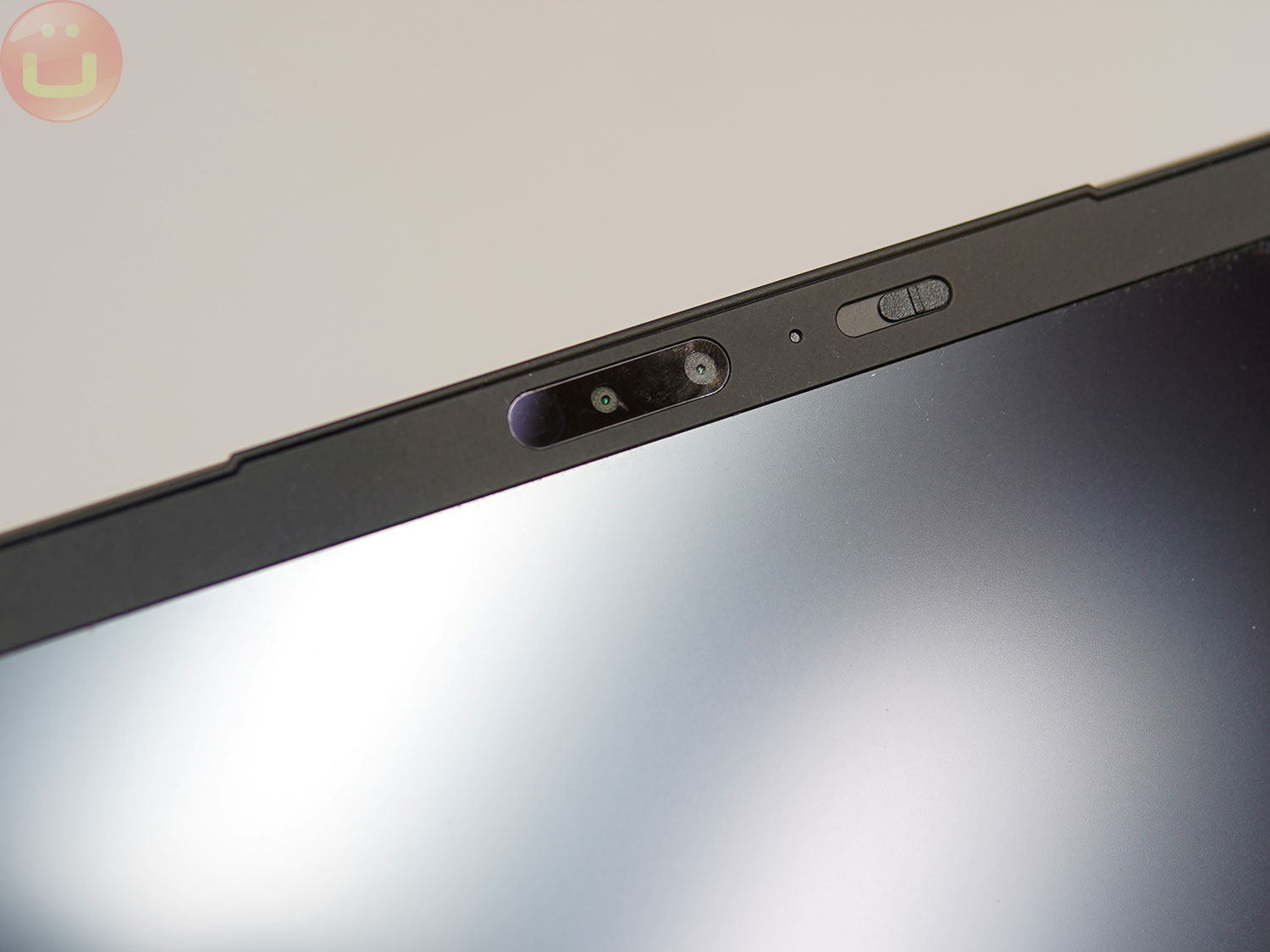
The 1080p webcam is a noticeable improvement over the previous 720p model. As people increasingly use video calls, this is a significant improvement. It may even become decisive factor in the weight category of about 2 pounds, since all components need to be as small as possible, which can affect image quality.
Image quality is quite acceptable and above average for its price range, even in low light. There's some noise (grain), but the frame rate remains high, and the quality is sufficient for productive video calls without the distraction of a poor video stream.
Lenovo claims the lens has aperture f/2.0 (and a four-microphone array), indicating that manufacturers may soon begin competing on camera features, as they do in smartphones.
Performance
Our ThinkPad X1 Nano is equipped with a processor Intel Core i7-1280P , which is even faster than the 1260P in the X1 Carbon Gen 10 we tested previously. This allows the laptop to perform better in CPU benchmarks like Geekbench (approximately 2x faster than the previous generation) and productivity tests like PCMark 10.
This is the most noticeable and valuable improvement for those hesitant to buy the first-generation X1 Nano due to the potential performance compromise.
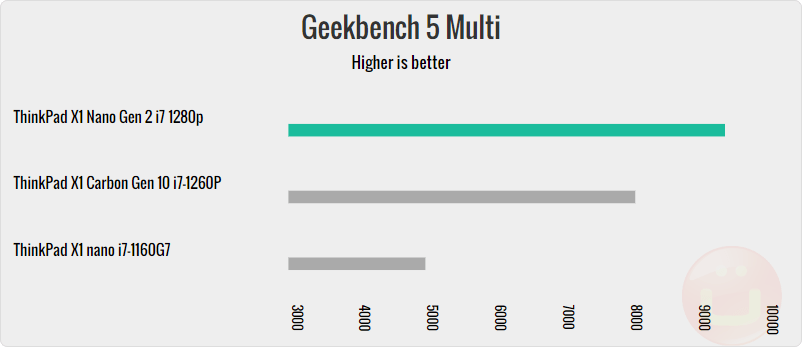
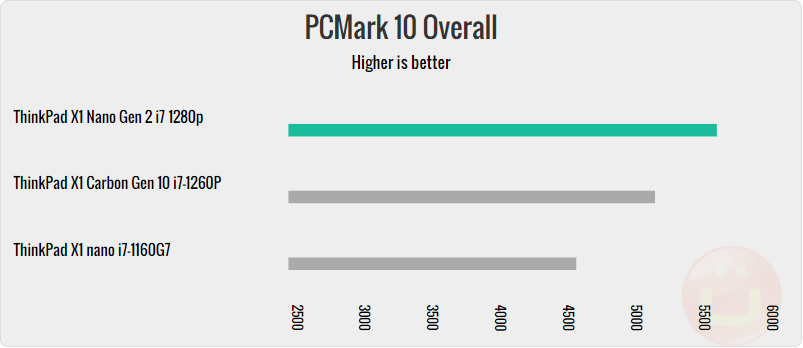
The same applies to GPU-intensive benchmarks, such as 3DMark TimeSpy. While this isn't a gaming device, both CPU and GPU benchmarks show that there's no performance penalty when upgrading from the X1 Carbon Gen10 to the X1 Nano Gen 2. For a laptop designed for work, it packs a serious punch.
«"The most noticeable and valuable improvement"» 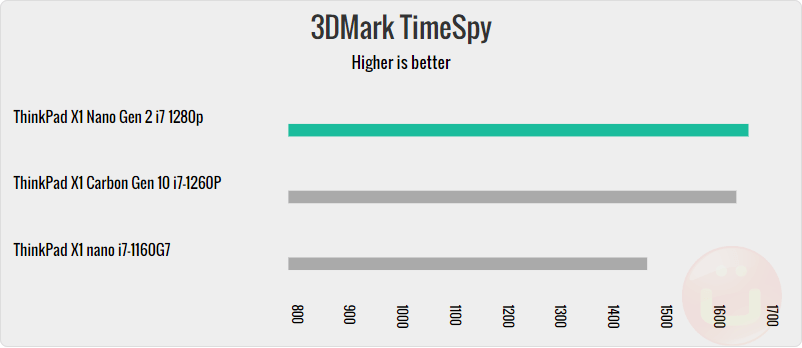
It's important to remember that the X1 Nano series isn't designed for use as a high-performance workstation. It only has a single fan, which produces relatively low noise levels, so its cooling capacity isn't fully utilized.
Therefore, running the processor at 100% for extended periods will eventually lead to overheating and reduced performance due to overheating. However, typical office applications should not cause such problems.
The SSD's performance is slower than the X1 Carbon's, but it didn't negatively impact benchmark results, even in PCMark 10 tests where some disk activity was observed.
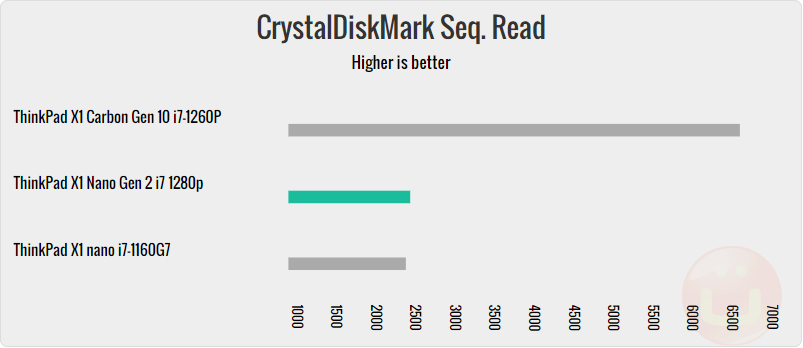
The X1 Nano SSD we tested has a 1TB KBG5AZNT1T02 LA KIOXIA SSD, while the X1 Carbon Gen10 has a 512GB Samsung MZVL2512HCJQ-00BL7.
Performance to weight ratio
When a laptop is so lightweight, it's crucial to consider the performance-to-weight ratio; few people consider this. The data shows the X1 Nano Gen 2's incredible performance-to-weight ratio across all benchmarks, a remarkable achievement for the ultra-mobile category.
This metric should be the MAIN performance metric to watch, because no one buys these types of computers to achieve the "absolute performance" we've already determined is superior in this category.
Battery life
In the PCMark 10 Modern Office test, this laptop's battery life was 8 hours 8 minutes at battery capacity 49.6 Wh . This is significantly less than the first generation X1 Nano Gen 1, but this is easily explained by the much higher performance of the X1 Nano Gen 2.
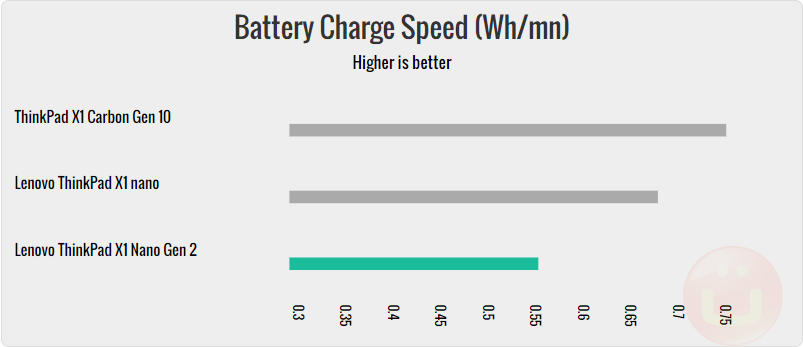
The X1 Nano Gen 2 features a significantly more powerful and energy-efficient processor, and we're testing the fastest version of this laptop. If longer battery life is important to you and maximum speed isn't crucial, you might want to consider the version with a Core i5-1240P processor, which doesn't have as many high-performance cores.
Using Lenovo 65W charger , we noticed that while the battery still boasts 'fast charging' support, it doesn't charge as quickly as the X1 Nano Gen1 or the latest X1 Carbon Gen 10.
Conclusion
Lenovo ThinkPad X1 Nano Gen 2 (official page) is an excellent thin and light (approximately 900g) laptop. All the specifications confirm this. However, in the ultra-mobile category, it is unrivaled.
Here's why people want this computer, which is supported by the market data we studied. People compare it to the iPad, which indicates they need something much lighter than a thin and light laptop. But if you need a Windows computer that can run all the Windows apps you already use, the iPad isn't for you.
«"In the ultra-mobility category, it has no equal.".
Furthermore, the data shows that people compare it to thin and light models like the ThinkPad X1 Carbon Gen 10, XPS 13, MacBook Air (M1, M2), ThinkPad Z13, and ThinkPad T14. However, they are significantly heavier than the X1 Nano Gen 2, so I put them in a different category, and the carrying experience is completely different.
If you need 0.3-1 inches more display diagonally and don't mind the extra weight, it might be a compelling purchase. However, if you want the lightest 13-inch computer without sacrificing performance, the ThinkPad X1 Nano Gen 2 is the only option. It's simply the best laptop under 2 pounds on the market right now.
High performance
- Excellent performance
- 2K display
- Great sound
- Docking potential
- Mil-STD tested for durability
Low performance
- Less battery life compared to the first generation.
- Limited port availability
- More expensive than bulkier laptops.